|
What is COMTEK /400?
The COMTEK /400 is an application which allows IBM i/iSeries servers to be monitored and
managed by any SNMP enabled Network Manager or NMS.
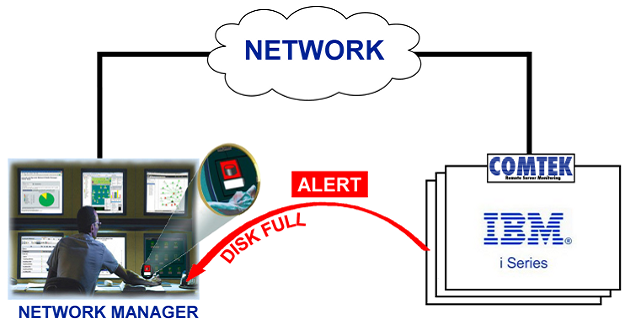
COMTEK ALERTS include: Disk Full, CPU Excessive, Critical Processes Failure, Active Job Status, JOBQ Threshold, QSYSOPR message, Other system messages, User Defined Alerts and others. COMTEK will Monitor and Filter Messages Queues, including QSYSOPR. COMTEK will watch the QUEUE for important messages and forward those messages to the Network Manager for appropriate action. Multiple queues may be monitored.
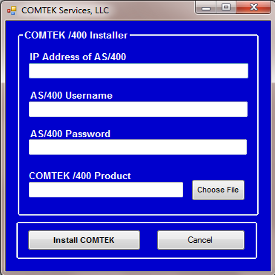
6.0 Rapid DeploymentThe Quick Installer application reduces install time down to a few minutes by completing the install steps automatically, making rapid deployment a reality. This is especially important to users with many iSeries systems and/or multiple locations.Other COMTEK /400 Features and Functions COMTEK /400 works with the IBM-supplied SNMP master agent. This means that only IBM TCP and SNMP software are used for communications. It is not possible for COMTEK to affect network performance. What is in the COMTEK MIB?The COMTEK /400 MIB (Management Information Base) is one of the most comprehensive /400 MIBs in the industry.The COMTEK MIB includes status information on CPU Usage, Jobs in System, Storage Capacity and % used, Pools, Disks, Users Signed On, Batch Jobs Running, Job Queues, Communications Lines and Controllers, and many others. More MIB information follows below. COMTEK can provide any of this information to your SNMP manager at all times. Your Network Manager can POLL for information at whatever interval you wish. This allows you to take corrective action BEFORE users are impacted. Another use for this information is to learn about the usage of the system, and plan for future requirements. COMTEK ALERTSCOMTEK /400 provides user configurable alerts for Excessive CPU Utilization, Disk Full, Critical Process Missing, QSYSOPR Message, User Message, and JobQ Threshold.Prior Versions of COMTEK /400Beginning with version 3.06, COMTEK /400 does not require a “lock” on QSYSOPR. This means that QSYSOPR can be “shared” by other applications while COMTEK /400 is monitoring QSYSOPR. An operator can have QYYSOPR in “break” mode while COMTEK /400 is monitoring it. COMTEK /400 was previously called NMServer. It has been in continuous use since its intial release in 1998.Recent Releases: Version 3.11 available February 18, 2011. Version 4.1 available September 21, 2012. Version 4.2 available fall of 2014. Version 6.0 available September 2016. What does COMTEK /400 for iSeries monitor? (What is in the MIB?)In SNMP terminology, the information gathered and maintained by an SNMP agent is represented in a Management Information Base or MIB. The MIB for COMTEK /400 was tailor-made for the IBMi, not adapted from some other operating system.
Click here to see the more details on the AS/400 MIB. What alerts (SNMP traps) does c provide?As a proactive system management tool, COMTEK /400 provides a variety of trap types. Traps are issued by COMTEK /400 when system conditions exceed thresholds that you have set.
Will COMTEK /400 for iSeries work with the IBM-supplied SNMP agent?Yes. COMTEK /400 is implemented as a series of SNMP subagents that extend the capabilities of the IBM supplied SNMP Master Agent. How would I use COMTEK /400 for iSeries?SNMP network management is composed of two major pieces - an Agent (such as COMTEK /400) running in each element that you wish to monitor and a Network Manager or NMS running in a remote server. Your organization may be using an NMS to monitor its local or wide area network presently. If so, COMTEK /400 would allow this same NMS to monitor and manage your iSeries servers. Similarly, if you are implementing a new Network Management system, you may wish to include your local or remote iSeries servers. How can I monitor my own queues?The COMTEK /400 Generic Queue Monitor Subagent can be configured to watch any iSeries message queue for new messages. An SMNP trap is sent to the NMS for each new message placed in the queue.
What is included with COMTEK /400 for iSeries?COMTEK /400 is a complete package - it includes the iSeries SNMP Agent, MIB, Installation Aids, Documentation and Support. Click here to request a Price Quote for this product.
|


COMTEK /400 Agent for iSeries
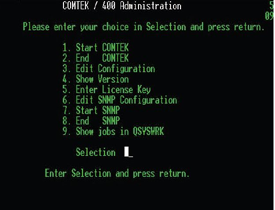
 Messages can be filtered by Severity